


 Enhance the knowledge with our blog
 Energize your creative execution from us.
 Analyze the technical discovery with us
As we all know that there is alot development under mobile technologies, different device specifications brings the unvailed feature product in technology.Beyond all these circumtances the mobile phone manufacturers brought up the tough competition in the markets, so this time i have categorised and rated the smart mobile devices as per there market and consumer needes.
Saturday, March 23, 2013
Sunday, March 10, 2013
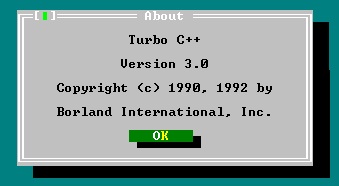
Yes you can install your Windows XP copy within 5minuites

Procedure:
1. In the step of Installing windows you will see a message that SETUP WILL COMPLETE IN APPROXIMATELY 39minuites...........

Here you have to press SHIFT+F10.
NOW COMMAND PROMPT WILL OPEN>>IN THAT TYPE TASKMGR
IN TASK MANAGER > >CLICK ON PROCESS TAB.
NOW RIGHT-CLICK ON PROCESS.EXE.>> GO TO SET PRIORITY >> SELECT HIGH.
CLOSE TASK MANAGER & CMD WINDOW
HERE U DONE :D
Hello Guyz,
In this post i will tell how to secure your PC login from unauthorised access.so this concept is totally related to your PC/laptop Webcam device therefor to get this feature u need webcam.

1.Download this software DOWNLOAD LINK1
DOWNLOAD LINK2
2.Install it in your PC.
3.After installation it will ask for to capture an image >ok
4.Image appear to confirm.>ok
5.Enter a password for your account
6. Restart your PC.
In this post i will tell how to secure your PC login from unauthorised access.so this concept is totally related to your PC/laptop Webcam device therefor to get this feature u need webcam.
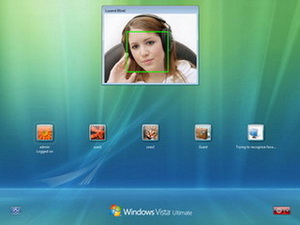
1.Download this software DOWNLOAD LINK1
DOWNLOAD LINK2
2.Install it in your PC.
3.After installation it will ask for to capture an image >ok
4.Image appear to confirm.>ok
5.Enter a password for your account
6. Restart your PC.
Thursday, February 28, 2013

ARE YOU FACING THIS ISSUE:? IF YES THEN YOU ARE AT THE RIGHT PLACE TO SOLVE THIS ERROR...
THIS HAPPENS DUE TO THE INVALID WINDOWS 8 OPERATING SYSTEM KEYS AND THE USE OF CRACKING SOFTWARE'S TO ACTIVATE PIRATED WINDOWS 8
NO TO WORRY .....
JUST DOWNLOAD THE WINDOWS 8 ACTIVATOR FROM TORRENT SITES...OR ANY SITES
IN ACTIVATOR JUST PRESS UNINSTALL BUTTON FROM THE MAIN MENU...
RESTART YOUR SYSTEM ...
HERE YOU DONE .... :D
AFTER CLICKING ON DEVELOPER LICENSE AGREEMENT YOU WILL FORWARDED TO THE MICROSOFT LOGIN ACCOUNT.....
STILL PROBLEM NOT SOLVED ........?
COMMENT HERE TO GET INSTANT REPLY..
Wednesday, February 20, 2013
Google's Street View tool is more layered and comprehensive than
you might think. While you may be familiar with the orange peg man at
the side of Google Maps, there's a lot more different modes and options
available once you enter the 360-degree panoramic world of Street View.
Explore and discover like a pro with some Street View tips.

Navigate in Street View
You don't have to zoom back out of Street View every time you want to take a look at a new location because it's possible to move around within Street View itself. Click the forward and backward arrows beneath your virtual feet, or double-click on a spot in the distance to zoom straight there. Use the compass to turn yourself around. You can also click and drag the peg man using the mini map.Check Local Addresses and Places
Google Street View enables you to check the address of your current location via the overlay box in the top left corner. In some cases you may also see the name of the road you're currently traveling on beneath your feet. Local places, including venues, bus stops and businesses, appear in the Street View window just as they would in Google Maps. Click on any of these points of interest to see more details about them without leaving the Street View screen.See Nearby Photos
In the Street View interface is a drop-down menu listing labels and photos. Labels are the points of interest on the local map, such as businesses and restaurants. Select "Photos" and you can see user-submitted pictures from the local area. These photos may not all be from the exact position you're currently standing at, but they will be in many cases, particularly if you're visiting a famous landmark or tourist spot. Click the cross to return to the original Street View pane.Leave the Street
Google's Street View service now extends far beyond streets, covering footpaths, ski runs and railways too, as well as the interiors of well-known landmarks. Load the Street View portal (link in References) to see a selection of panoramic images from Antarctica, the Great Barrier Reef, the Palace and Park of Versailles and many more areas. Third-party tools are also available, including Globe Genie, that can drop you at a random point in Street View anywhere in the world.
Subscribe to:
Posts (Atom)

Today Visits


