• RSS
  • Facebook
  • Twitter

  • Explore

    Enhance the knowledge with our blog

  • Implement

    Energize your creative execution from us.

  • Discover

    Analyze the technical discovery with us

  • Thursday, November 15, 2012


    http://pkmail.files.wordpress.com/2012/10/wifi-hacking.png

    Guys after along period i have tried this trick which is very successful nowadays,because everyone is disturbed with their internet speed specially high end users therefore i am writing a great hacking trick which works on almost all operating systems and free version utility software.


    1.Download the free utility FROM HERE

     DOWNLOAD

    2.Just install it in your pc

    3.follow above instructions
    Hello user,
    you are reading this page because you are testing to CUT-OFF . Please note once been cut-off, the device will not be able to use internet resource unless you resume him.
    When you about to CUT off someone, it's very fine if you are the network owner. and kick off users who are not suppose use your resource is about to happen in one second.
    if you are network Admin, Giving the tools original purpose, please also consider following solution.
    1. Encrypt your WIFI with a strong password, and not use WPA.
    2. Buy a hardware managed switch, and configer MAC - port binding.
    3. Do a host to host ARP Cache anti spoof setup.  --Install Netcut Defender for your users ----> The one tool only that can 100% guaranteed success protect you and your user away from arcai.com's netcut cut (or alike) ARP SPOOFIng , and it's free
    You are free to use netcut to test out your configuration, please note if you are not the network owner, it not recommand you CUT off someone for your personal use.
    Cheers.

    Friday, October 26, 2012

    Do you love Marathi Language?.....Getting problems to learn Marathi Fonts?.... If your answer is yes then you must check out this online version of word to word conversion from English to Marathi words.

    LINK:- http://www.marathi.changathi.com

    Click on above link to get full idea of website


    • Do not copy paste write your self word by word.

    • It is a marathi writing tool.

    • Add an extra space after you type the word.

      eg: 'marathi blog ' ( 'marathi<space>blog<space>' )
      eg: 'sachin tendulkar ' ( 'sachin<space>tendulkar<space>' )

    • Write(type) your name in english and add an extra space at the end of your name then you will get your name in marathi font.

    • If you don't get the correct marathi conversion press <backspace> button two times ans you will get marathi word suggestions and you can select the correct word.

    Monday, October 22, 2012

    http://www.gmavt.net/images/services/DSL_image.jpg 


    TIED UP WITH SLOW INTERNET SPEED?
    JUST FOLLOW ABOVE TRICK TO GET HIGH BANDWIDTH 

    Go to Start>>Run and then type in gpedit.msc

    Computer Configuration -> Administrative Templates -> Network -> QoS Packet Scheduler.
    after that, you should see something like “Limit Reservable Bandwidth”. Modify that and set it to “Disabled”, or you can put it to “Enabled” and change the value to 0.

    Now this will increase your internet speed by 30%


    Nowadays there are many websites which are using java script for their security purpose so the user or viewer of the website unable to copy or access the content from related webpages..for this i have found a unique way to copy the contents from related webpages.

    http://thumbs.dreamstime.com/thumblarge_240/1203907498k2o2O3.jpgJUST DOWNLOAD THE ABOVE ADD-ON FOR MOZILLA BROWSER

    https://addons.mozilla.org/en-US/firefox/addon/web-developer/

    ADD THIS ADD-ON TO UR BROWSER AND DO FOLLOWING STEPS:-

    1} FROM DISABLE OPTION> DISABLE JAVA SCRIPT >DISABLE ALL JAVA SCRIPT...

        HERE WE DONE...

    NOW U R ABLE TO ACCESS ALL THE CONTENTS ON WEBPAGE.

    Tuesday, August 14, 2012

    http://www.chillinside.com/wp-content/uploads/2010/04/turbo-cpp.png

    Download TURBO C compiler for free

    Wednesday, August 1, 2012


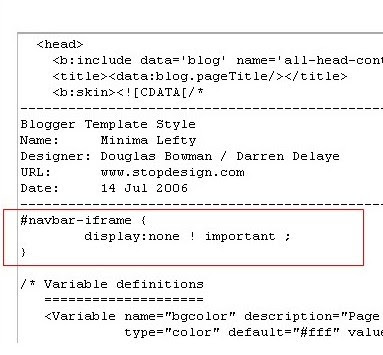
    https://blogger.googleusercontent.com/img/b/R29vZ2xl/AVvXsEjkYnug2Z7cH0l39sl0pSai_GUgda2wt_y3-mzu1VMhaOGf9UQhotMCNW0bN3vXJ82eYJUOwEV4R-XwtArOCDsAgxwCu12oWHz98DxA1A3b1FhhBcnuRVDT9oSaQl1C-TZ5SwJs5FBmPGM/s400/remove-blogger-nav-bar.pngRemove Navigation Bar from Blogger by simple copy paste HTML code.

    STEP :1


    Open Edit HTML option from Dashboard > Design .


    STEP:2
    https://blogger.googleusercontent.com/img/b/R29vZ2xl/AVvXsEi5UWxCU9utLoJYI5n_2i6jSxX2If7K771a2veBuOvjVh818IaywBlqKrpvzZf9_1wjV3Pbjrf35TNc8Qw2D1t3qgJsVLnTwcy5eCPJWj6iTw2a8xcNhP8y0mABoR-2HnPSoeO9YaTJtBiN/s400/how+to+remove+blogspot+navbar.jpg

    Before /* Variable definitions and after Blogger Template style End line copy paste the above line

    #navbar-iframe {display:none !important;}

    Now press the save Template option.

    Great now you successfully done the job.

    YOUR NETWORK

    Sign by VISHWABRAMHA TECHNOLOGIES -

    Followers

    Today Visits